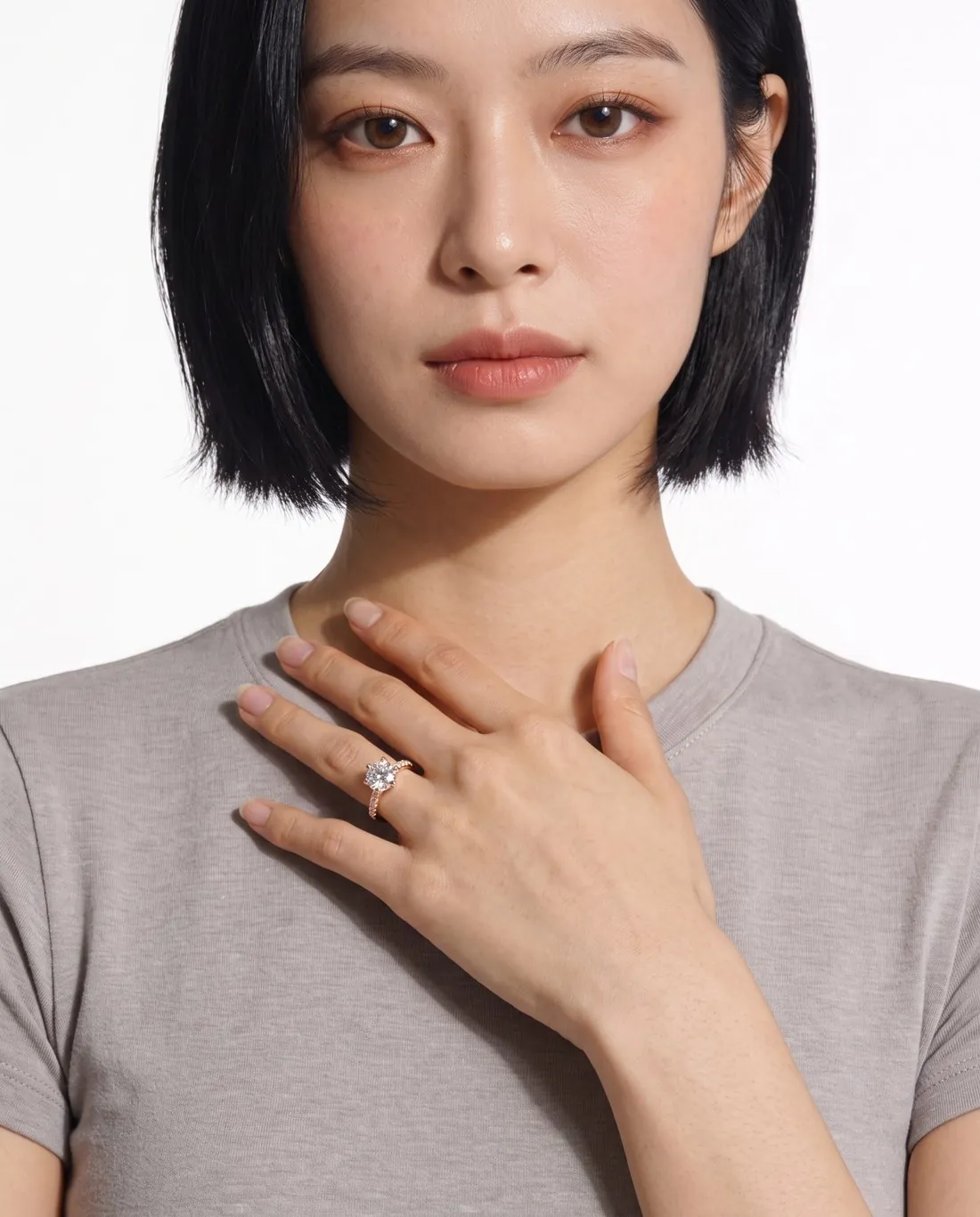
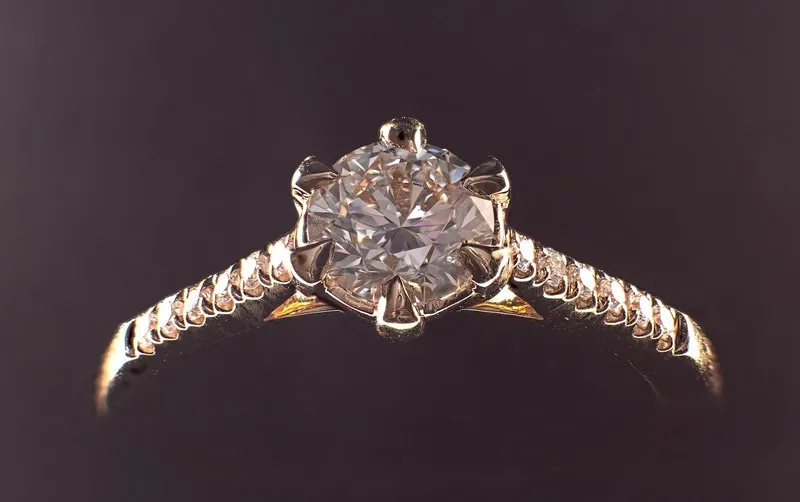
Can AI put jewelry or glasses on a model?
Yes, AI can put rings, earrings, necklaces, bracelets, eyeglasses and sunglasses on a model from one plain product photo, provided the tool knows what the piece is. The piece type sets the frame: a ring needs a raised hand, a necklace needs a bare neckline and glasses need a close portrait. The photo itself needs a plain surface and soft light, as the guide on photographing jewelry and accessories for AI explains.
A general image generator can try the same job. Google's documentation for Nano Banana 2 allows up to 10 object images and up to 4 character images, so a ring and a model can be supplied together. The result is a new drawing of the piece, and no piece-type setting frames it.
| Piece | Source photo | Usual worn frame | Check first |
|---|---|---|---|
| Ring | The ring alone, stone towards the camera | Hand raised to the collarbone, one ring on the ring finger | Stone, claws, band width |
| Earrings | The pair flat, side by side, no overlap | Head in three-quarter profile, one earring visible | Stone count, drop against the lobe |
| Necklace | The whole chain laid out, not coiled | Lips to upper chest, shoulders bare | Link style, drape, clasp at the back |
| Bracelet | Whole band and clasp, square to the camera | Forearm across the body, wrist turned to the camera | Count, charm position, hand and wrist |
| Eyeglasses | Whole frame and both temples, temples open | Head and shoulders, slight three-quarter turn | Clear lenses, hinges, temples |
| Sunglasses | Upright, lenses towards the camera | The same close portrait | Tint, gradient, mirror finish |
How do I make an AI model wear a ring?
To make an AI model wear a ring, upload one sharp photo of the ring alone and select ring as the type, so that the tool frames a raised hand with one ring on one finger. Stand the ring in a slit cut in white card, or lay it on a matte surface, with the stone towards the camera. Keep fingers out of the photo: a ring photographed on a hand has part of its band hidden, and the hidden part cannot be copied faithfully.
Check the centre stone's cut and colour, the number of claws, the count of any halo or side stones, and the width of the band against the finger. An oval stone must stay oval, and a four-claw setting must keep four claws. An image shows style and proportion only, so ring size and band width belong in the listing text.
How do I make an AI model wear earrings?
To make an AI model wear earrings, photograph the pair flat and side by side with an equal gap, then select earrings as the type, so that the tool frames the head in three-quarter profile with the hair behind the ear. The model wears the pair and the camera sees one earring, which is the usual way earrings are shown worn.
Measure the drop before uploading, then compare the earring with the lobe in the image. Asymmetric pairs need a flat photo of both, because the worn image shows only one side.
How do I make an AI model wear a necklace?
To make an AI model wear a necklace, lay the whole chain out flat at its full length rather than coiled, photograph it alone, and select necklace as the type. The usual frame runs from the lips to the upper chest with the shoulders bare, so the necklace lies on the skin. A pendant should hang centred, with the clasp at the back of the neck.
Look for extra chain or a connector that leads to the pendant, because a tool can re-route a chain to bring a part to the front. Length needs a real check too: Herofab's Jewelry studio has no length setting, so compare where the pendant rests with the piece on a real neck.
How do I make an AI model wear a bracelet?
To make an AI model wear a bracelet, photograph the whole band and clasp on a plain surface, shoot a bangle or cuff square to the camera, and select bracelet as the type. A steep angle bends round shapes, and the bend carries into the result. The usual frame has the forearm crossing the body with the wrist turned to the camera.
Photograph a stack together only if it is sold as a set, because in Herofab's Jewelry studio the model wears as many bracelets as the photo shows. Where one element differs, such as a charm or a larger bead, keep it sharp in the photo; it is placed on top of the wrist. Check that the wrist and forearm join the hand in one continuous line.
How do I make an AI model wear glasses or sunglasses?
To make an AI model wear glasses or sunglasses, photograph the pair alone with the whole frame and both temples in view, then select eyeglasses or sunglasses, so that the tool places them once on a face in a head-and-shoulders close-up. Clean the lenses, open the temples to the stop and stand a sheet of white card in front of the pair, so that the lenses reflect an even surface and not the room.
Eyeglasses should keep clear lenses with the eyes visible and only soft reflections. A tint the real lenses do not have is a reason to generate again. For sunglasses, compare the depth of the tint, the direction of any gradient and any mirror finish with the pair in hand, in the same kind of light.
Then check how the frame sits. The glasses should rest on the nose and both ears, level across the face, with each temple running back to an ear and both lenses the same shape. Compare the hinges, rim thickness and any temple logo with the real pair. The image is not a fitting: a frame's width, lens height and temple length belong in the listing text.
Which tools put jewelry and glasses on an AI model?
Accessory try-on tools put jewelry and glasses on an AI model; a general image generator or a real shoot with a hand model are the alternatives. As of 13 October 2026, FASHN, Photta, Photoroom, Claid, Modelia, Botika and Pebblely all listed accessory try-on on their sites, and coverage differs by piece. A live AR try-on on a shop page is a different product: it shows a shopper's own face and produces no listing image.
| Option | Covers | Cost basis | Limit |
|---|---|---|---|
| Herofab Jewelry studio | Earrings, necklaces, rings and bracelets in a close frame | 5 credits per image, $0.20 to $0.60; 4K one extra credit | No pose or back view, one product per image, no bust or stand |
| Herofab Eyewear studio | Eyeglasses and sunglasses in a head-and-shoulders close-up | 5 credits per image, $0.20 to $0.60; 4K one extra credit | No pose, back view, profile or full-length frame |
| Other try-on tools | Accessory try-on, listed 13 October 2026 | See the jewelry and eyewear comparisons | Coverage differs by piece type |
| General image generator | Any piece, by prompt and reference | Free tier limits or a paid subscription | No piece framing, and the piece is redrawn |
| Real shoot with a hand model | Any piece, photographed for real | ProductPhoto.com: $40 per on-white photo for 1 to 10 photos, plus $15 for a hand or foot model (read 31 October 2026) | A shipped sample and a longer lead time |
What do Herofab's Jewelry and Eyewear studios keep and offer?
Jewelry studio is briefed to keep the shape, the metal colour and finish, and the number, colour, cut and placement of every stone, bead or pearl. Eyewear studio is briefed to keep the frame shape, rim thickness, colour and finish, the bridge, hinges and temples, any temple logo, and the lens shape and tint. A brief is an instruction to the tool, not a promise of an identical copy.
Both accept a ready-made model, a created model or a model photo you have permission to use, with a neutral or smiling expression. Backgrounds are studio white, studio grey, outdoor, lifestyle, a location, the model photo's own or your own image. Formats are 1:1, 3:4, 4:5, 2:3, 9:16 and 16:9 in 2K or 4K, with 20 marketplace sizes at download. In jewelry, the type must be selected to get its frame; without a type, the piece falls back to a general close-up.
What goes wrong when AI puts jewelry on a model?
Scale is the first thing to check when AI puts jewelry on a model, because a try-on tool takes no measurement of the piece and has to estimate its size on the body. Compare the width of a ring against the finger, the drop of an earring against the lobe and the point where a pendant rests. Small stones, fine chains, filigree and engraving come next, followed by metal colour under warm light.
Herofab's own check gives a small sample. Within Virtual try-on, 3 of 20 jewelry images and 0 of 4 eyewear images were flagged in the run that ended on 12 October 2026. Both groups are too small for a percentage, and an automated check does not measure scale.
Size and appearance are also a legal matter for US sellers. The FTC's Jewelry Guides, at 16 CFR 23.1, say it is unfair or deceptive to misrepresent a product's type, quality, metallic content, size, weight, cut or colour, among other aspects. A note to that section says a depiction of a gemstone that portrays it in greater than its actual size may mislead consumers unless the true size is disclosed. The Guides are interpretive, and this is not legal advice, but a generated image that enlarges a stone or changes a metal colour is a risk the seller carries.
AI product photo errors: 303 images checked
Can an on-model jewelry or glasses photo be the main image?
An on-model jewelry or glasses photo should not be the main image on Google Shopping or Amazon, and on Zalando jewellery opens with a packshot; the worn image belongs among the additional images. Google Shopping shows accessories alone in the main image and on a model in additional images, Amazon asks for clothing accessories to be shown flat and without a model, and Zalando does not accept a model image as the first image of a jewellery article. Rules change, so read the current page for each channel.
On an own shop, a worn image often works as the second image: it shows how large a piece is on a body and how it hangs. Pair it with a plain packshot and a close-up of the stones, clasp or temple logo. Herofab's Packshot studio makes the plain image and Detail shot frames the close-up, at 4 credits per image, $0.16 to $0.48.
Marketplace photo rules for accessories
When should jewelry or glasses be photographed for real?
Jewelry or glasses should be photographed for real when the image has to prove the exact piece: a certified diamond, a one-of-a-kind handmade work or an antique with visible age. A generated stone shows no clarity or grade, and hand-finished surfaces are where any redrawing shows first.
A real shoot is also the better route when the tool's frame is the limit. A necklace and matching earrings shown together need a real shoot or separate images, because Herofab's studios are briefed for one product per image. A profile view of glasses on a face is not offered in Eyewear studio, and jewelry on a bust or stand is not offered in Jewelry studio.
Eyewear studio has no setting for face shape or frame measurements, so a worn image cannot tell a buyer whether a frame will fit. An image cannot show lens protection or prescription either, and those details belong in the listing text.
How to photograph sunglasses and glasses
Checklist
- One piece alone in the source photo, whole, sharp and without flash
- The correct type selected before generating
- Stone count, cut, setting and metal colour compared with the piece
- Scale compared with the piece on a real ear, neck, wrist or finger
- No extra chain, connector or second ring in the image
- Hinges, temples, logo and lens tint compared with the real pair
- Size, measurements and materials stated in the listing text
Sources
- Cornell LII — 16 CFR 23.1, FTC Jewelry Guides
- Google — Gemini API image generation
- ProductPhoto — Product photography services and pricing
- Google Merchant Center Help — Best practices for advertising clothing and accessories
- Zalando Partner University — Jewellery image guide
Checked 31 October 2026. Rules change; the official pages are the final reference.